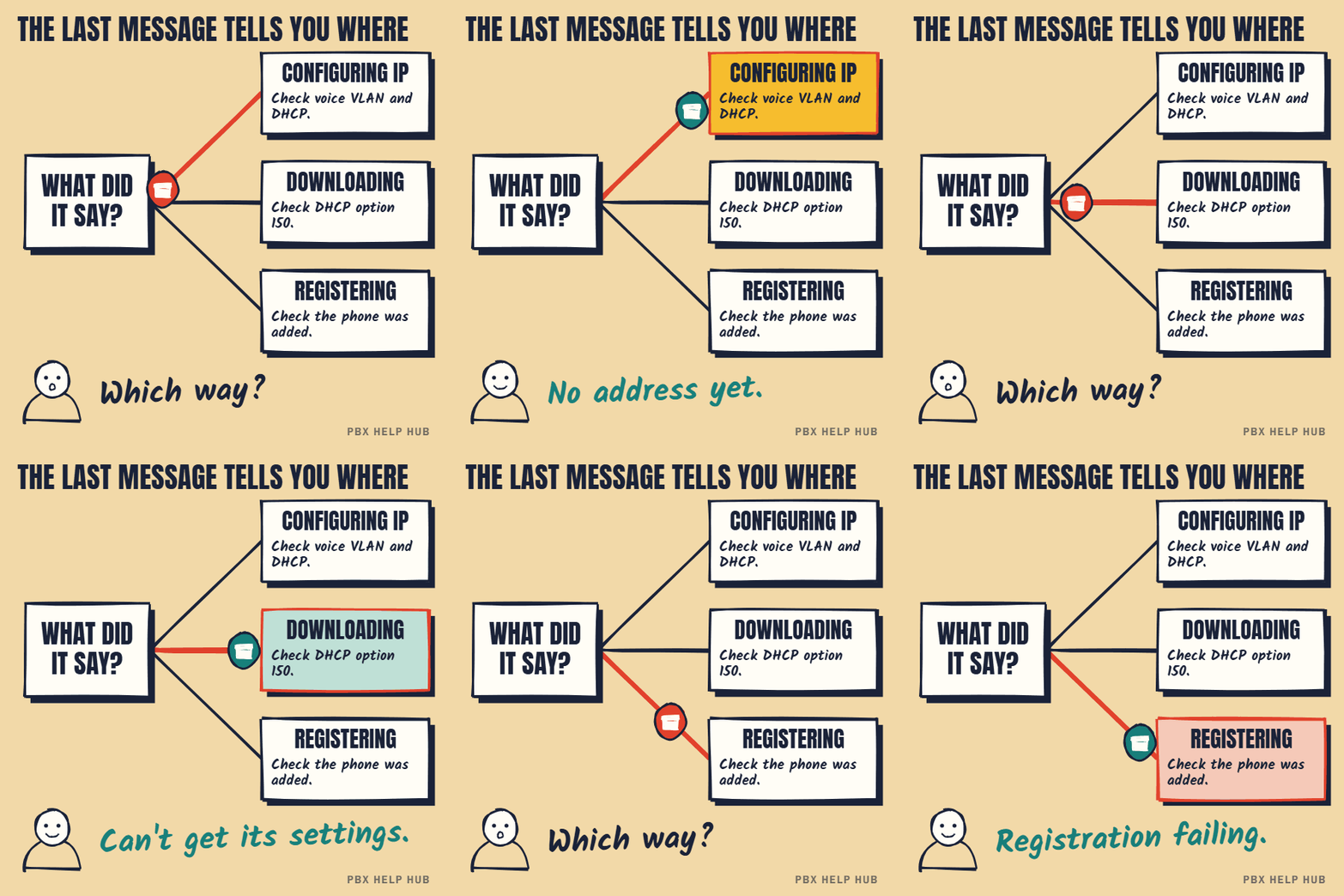
Start-up messages such as "Configuring IP" and "Registering" appear on the phone's screen, shown here on a 7965.

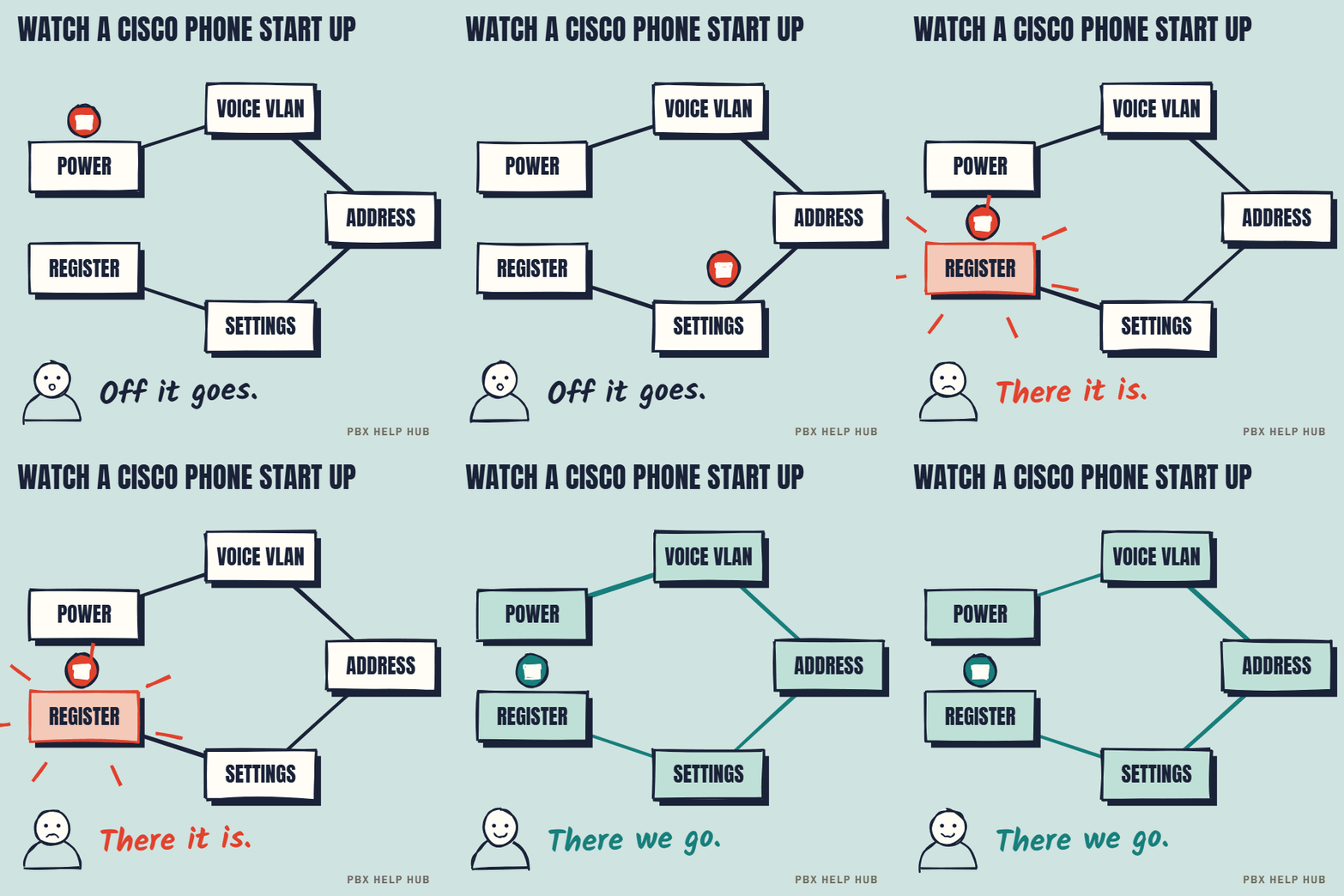
How a Cisco phone starts
- Power, usually from the network switch (PoE).
- Voice VLAN: the switch tells the phone which network lane to use. See Voice VLANs and DHCP for desk phones.
- Address: DHCP gives the phone an IP address, and usually the address of the server it downloads its settings from (often "option 150").
- Configuration: the phone downloads a settings file named after its MAC address, plus its trust list and any firmware update.
- Registration: the phone contacts Communications Manager, which checks it's a known device and lets it register.
Where it stops, and what that means
| Stuck on | Usually means | First check |
|---|---|---|
| No display, no lights | No power | Try a known working port; check PoE on the switch |
| "Configuring IP" or no address | DHCP or VLAN problem | Do other phones on the same switch work? |
| "Configuring" or "Downloading" | Can't reach the configuration server | Ask IT whether DHCP option 150 is set |
| "Registering" (loops) | System doesn't recognise it, or a trust list mismatch | Is the phone added in Communications Manager with the right MAC and model? |
| "Upgrading", then reboots repeatedly | Firmware mismatch or failed download | Leave it for 15 minutes, then escalate |
One phone, a moved phone, or many?
- A brand-new phone: most often it hasn't been added to the system yet. The system needs its MAC address (on the label).
- A phone that just moved desks: the new port may be on the wrong VLAN, or not provide power.
- A phone after a system change: a server replacement or certificate change can leave phones with an old trust list, so they refuse the new server. This needs an engineer.
- Many phones at once: look at the network, DHCP or the call servers, not the phones.
Don't delete the phone from the system, factory reset it, or erase its trust list as a test. Some of these steps are hard to undo and can stop the phone registering at all until an engineer fixes it.
many phones fail together, phones are stuck after a server or certificate change, or emergency phones are affected. See Escalate safely: when to stop and call an engineer.
The model, MAC address, last message on screen, the switch port, and whether the phone ever worked there. Our fault log has room for it all.
Adding a new Cisco phone to the system
A new Cisco phone won't register until it has been added to Communications Manager with its MAC address and correct model. The MAC address is on the label underneath. Unless your system is set to register new phones automatically, someone with admin access must create the device, give it a line, and assign it to a user. If a brand-new phone loops on "Registering", this is the first thing to check.
Trust lists, in plain English
Cisco phones keep a small list of servers they trust, and they won't accept settings from a server that isn't on it. That list protects against someone impersonating your phone system. It also means that when servers or their security certificates change, phones holding the old list may refuse the new server. The fix is controlled and should be done by an engineer, because erasing the list carelessly can leave phones unable to register at all.
Firmware updates during start-up
A Cisco phone may download new firmware as it starts, which can take several minutes and several restarts. That's normal after a system upgrade or when a new phone joins. Leave it for 15 minutes before deciding it's stuck. If it keeps cycling for longer, the firmware may not be available to it, or may not suit the model, which is a job for your engineer.
Common causes at a glance
| What happened | Most likely cause |
|---|---|
| New phone, never worked | Not added in Communications Manager |
| Worked, moved desk, now stuck | Port on the wrong VLAN or without power |
| All phones stuck after server work | Trust list or certificate change |
| Restarting repeatedly | Firmware download problem |
| A whole floor down | Network switch or power |
Your registration checklist
- Write down the last message on screen.
- Note the model and MAC address from the label.
- Try a network port where another phone works.
- Check whether other phones on the same switch work.
- Ask whether the phone is added in Communications Manager.
- Note any recent server, certificate or network change.
What fixes a Cisco phone that won't register
These come from people who had the same fault on 7800 and 8800 phones.
- Check the model in Communications Manager. The device is model-specific. If it was built as a 7941 and someone typed in the MAC of a new 8841, it will be rejected. Re-create it as the right model.
- Check the line has a directory number. A missing number was the cause in other reported cases.
- For new or second-hand phones rejected on arrival, suspect a trust list from another system. Communications Manager rejects a phone holding an ITL from another cluster. In that case, resetting the phone's security settings or a factory reset can be the right fix.
- Factory reset on a 7800 or 8800: unplug the phone, wait 5 seconds, then hold # while plugging it back in. When the Mute light goes out, press 123456789*0# within 5 seconds. Don't remove power while it resets.
- If it's still rejected, ask your administrator for a trace or packet capture, which shows the reason.
Only use a reset on a phone that isn't working anyway, and never on a whole group as a test. After a server or certificate change, leave it to your engineer.
Sources: Cisco: reset 7800 and 8800 phones ↗ · Cisco community: 8841 rejected ↗ · Cisco community: new phones rejected ↗ · Cisco community: CP-8841 rejected ↗
Common questions
Why is my Cisco phone stuck on Registering?
Communications Manager doesn't recognise it, or a security trust list on the phone doesn't match the server. Check it's added with the right MAC address and model.
What does Configuring IP mean on a Cisco phone?
The phone is waiting for a network address. Check the network port, voice VLAN and DHCP.
What is DHCP option 150?
It tells Cisco phones where to download their configuration files. Without option 150, or another way of learning the server such as option 66 or a manually set address, the phone can't find its settings.
Should I erase the trust list to fix registration?
Not as a test. It can stop the phone registering at all until an engineer fixes it.
Why does my Cisco phone keep registering, over and over?
It's reaching the system but not completing registration. Usually the phone isn't set up correctly in Communications Manager, or its trust list doesn't match the server. Note the exact message and ask your administrator to check the device.
What does "registration rejected" mean on a Cisco phone?
Communications Manager refused the phone. Common reasons are that it isn't added with the right MAC address, it's set up as a different model, or there aren't enough licences or capacity. An administrator can see the reason.
What does "unprovisioned" mean on a Cisco phone?
Generally that the phone hasn't received a working configuration, often because it hasn't been added to the system or its firmware type doesn't match your call control.
Sources
Last checked 9 November 2026 against the sources listed here. Menus and defaults can differ by software release, so confirm them on your own system. Spotted a mistake? Tell us.