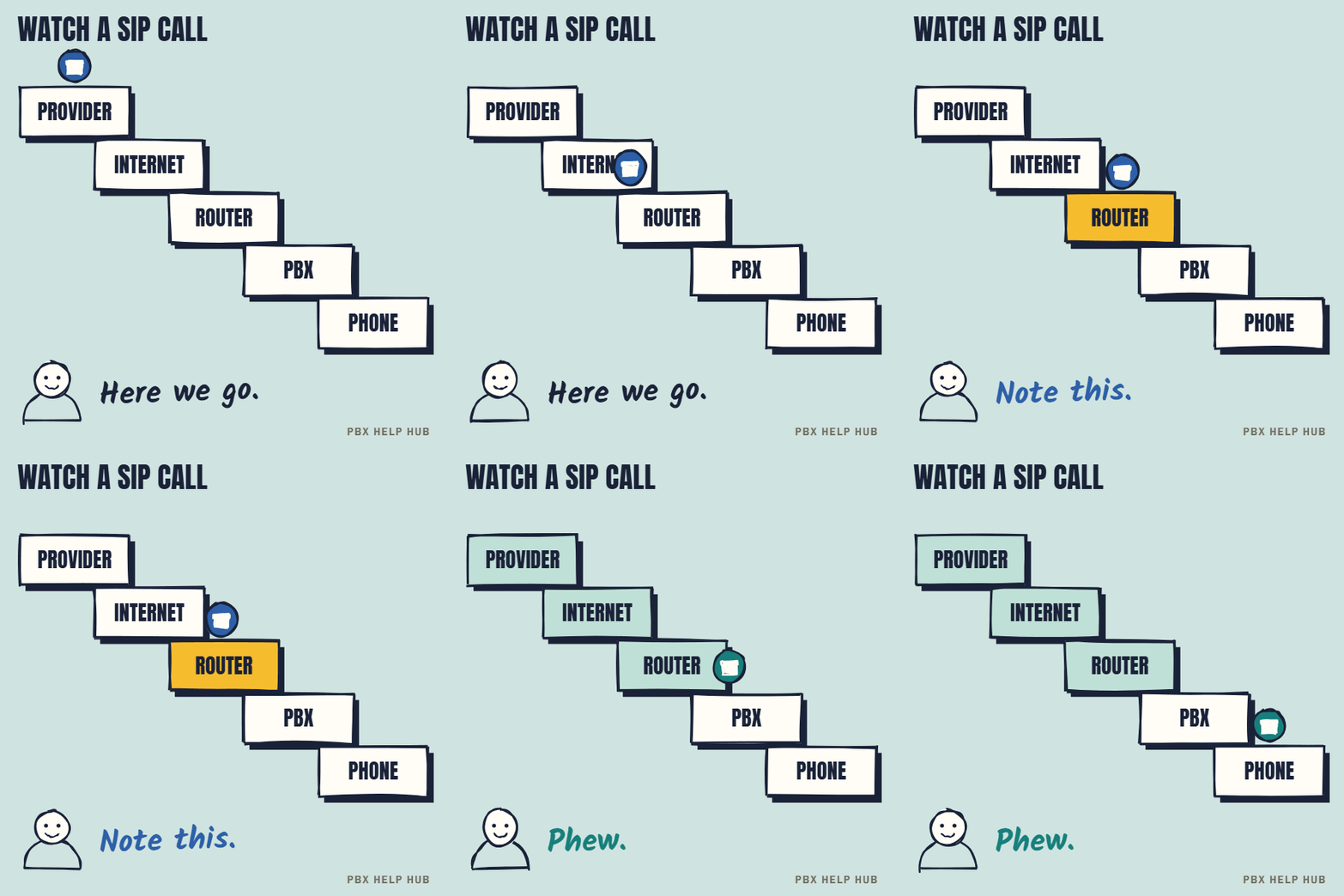
How it works
Many SIP trunks register with the provider over the internet, a bit like logging in. Others are recognised by your internet address and never register, so check which type yours is. Calls then travel as data: signalling messages set each call up, and speech travels separately as a stream of small packets. Your numbers (including every DDI) live with the provider, who sends each incoming call to your system with the number that was dialled.
SIP compared with ISDN
| ISDN | SIP trunk | |
|---|---|---|
| Delivered over | Dedicated lines from the phone network, usually copper and sometimes fibre | Your internet connection |
| Number of calls | Fixed by the channels installed | Set by your contract and bandwidth; easy to change |
| Numbers | Tied to the line and exchange | Can be moved or added more freely |
| Depends on | The phone exchange | Your internet, router and firewall |
| Future | Being switched off: ISDN switch-off: what it means for your on-site phone system | The standard going forward |
What you need for SIP
- A phone system that supports it, or a gateway that connects an older one.
- Enough bandwidth. As a rough guide, each uncompressed call uses around 100 kbps in each direction, so ten calls at once need about 1 Mbps each way, on top of normal office use.
- A suitable router and firewall, set up for voice. Some routers' "SIP ALG" feature causes problems and is often switched off.
- Ideally, priority for voice traffic, so a big download doesn't break up calls.
Questions to ask a SIP provider
- Is our phone system on your list of tested equipment?
- How many simultaneous calls are included, and what happens if we exceed them?
- Can we keep (port) all our numbers, and how long does it take?
- What happens to calls if our internet goes down? Can they divert to mobiles or a backup line?
- Do you support emergency calls with our correct address?
Faults that come with SIP
Because the internet connection becomes part of the phone line, new kinds of fault appear: a trunk that won't register, one-way audio and calls that drop. Each guide explains how to narrow the cause down.
Resilience: planning for the internet going down
Because SIP depends on your internet connection, an internet outage becomes a phone outage unless you plan for it. Options include a second internet connection from a different provider, a mobile data backup on the router, or automatic diversion of your numbers to mobiles or another site. Agree the plan with your provider and test it once a year.
Call quality: what affects it
| Factor | Effect | Usual fix |
|---|---|---|
| Not enough upload bandwidth | Choppy audio for the far end | More bandwidth, or limit other uploads |
| No priority for voice | Calls break up during big downloads | QoS on the router |
| Router rewriting SIP | One-way audio, drops | Review SIP ALG with the provider |
| Wi-Fi handsets or softphones | Variable quality | Wired connections for desk phones |
Emergency calls on SIP
Your provider holds an address for the numbers you send out. When someone dials 999 or 112, the number shown decides which address the emergency services see. If several sites share a trunk, make sure each site sends a number registered at its own address. Staff working from home may show the office address, so tell them to use a mobile for 999. Check that both 999 and 112 work from your phones, and ask your provider how to test this. Don't test by calling 999 without arranging it. VoIP calling can stop in a power cut or internet failure. Ofcom expects providers to have a solution giving at least one hour of emergency access during a power cut at the premises, free for customers who depend on their landline. Ask what yours offers.
Your SIP readiness checklist
- Confirm your phone system supports SIP, or needs a gateway.
- Check upload and download bandwidth for your peak number of calls.
- Ask whoever manages the router about voice settings.
- Agree a failover plan with your provider.
- Confirm the address held for each number you send out, and check 999 and 112 with your provider.
SIP trunk vs VoIP: what's the difference?
VoIP is the general technology for carrying calls over the internet, and a SIP trunk is one specific way of delivering those calls to a business phone system. So every SIP trunk uses VoIP, but not all VoIP is a SIP trunk. A hosted phone service or a calling app also uses VoIP, with no trunk connected to your own PBX.
Can an older phone system use SIP? ISDN-to-SIP gateways
An older phone system with only ISDN connections can often move to SIP through a gateway, a small device that converts between the two. The system carries on as if it still had ISDN. A gateway can be a good stop-gap if the system is stable and supported, but it adds one more device to support. Ask your maintainer whether your system needs one or can connect directly. See What is ISDN?.
Common questions
What is a SIP trunk in simple terms?
A phone line for your business phone system that runs over the internet instead of copper.
How much bandwidth does a SIP call use?
Roughly 100 kbps each way per uncompressed call, on top of normal office traffic. Confirm with your provider for your codec.
Can I keep my numbers when moving to SIP?
Usually yes, by porting them to the new provider. It takes time, so plan ahead.
What happens to SIP calls if the internet fails?
Calls stop unless you have failover, such as diverting to mobiles or a backup connection.
What is a secure SIP trunk?
One that encrypts its signalling and speech, usually with TLS and SRTP. Your provider and phone system both have to support it.
How does a SIP trunk connect to a PBX?
The PBX registers with the provider over your internet connection, or a gateway connects them if the PBX is older. Calls and numbers then arrive over that one connection.
Sources
Last checked 9 November 2026 against the sources listed here. Menus and defaults can differ by software release, so confirm them on your own system. Spotted a mistake? Tell us.