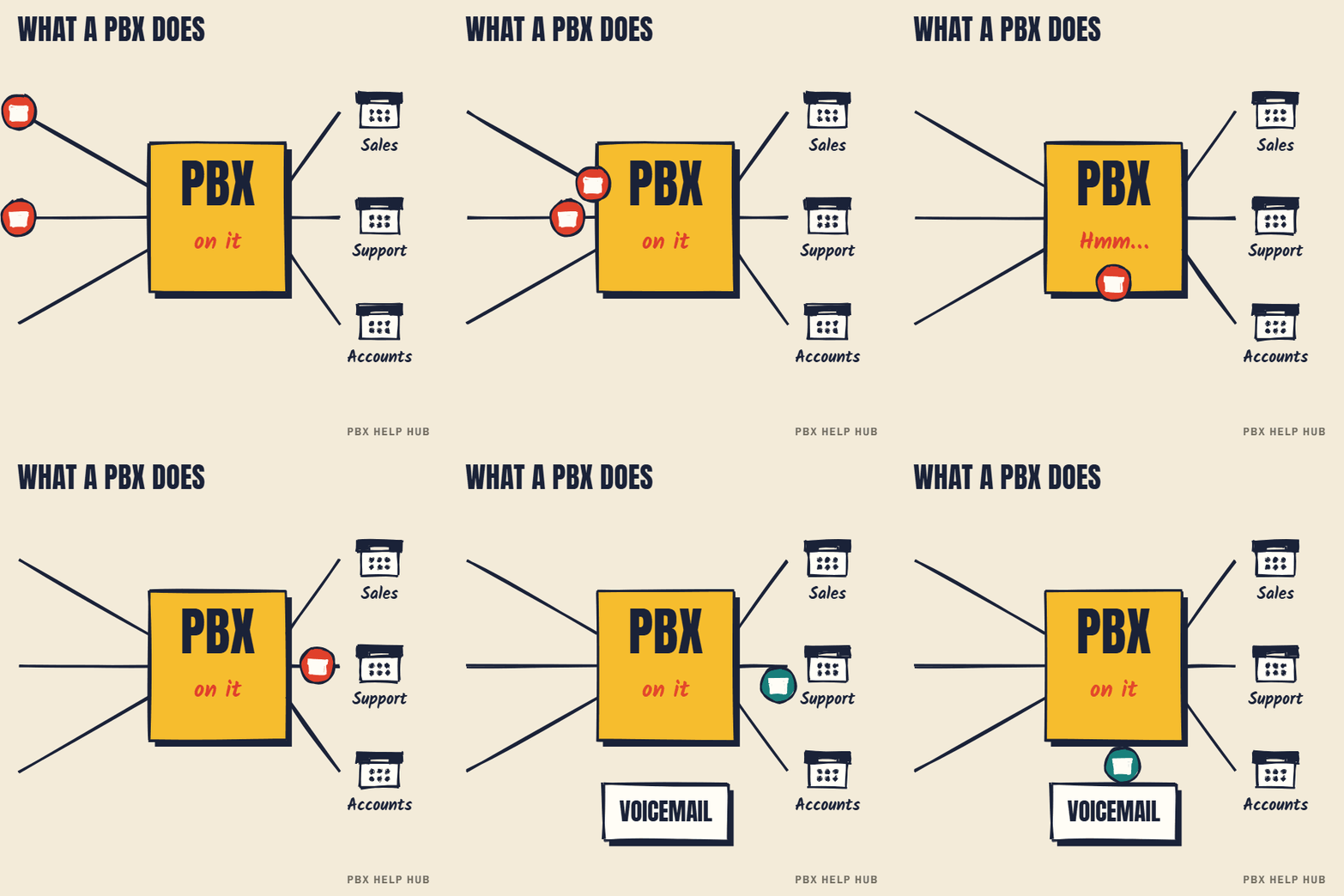
What a PBX does
A PBX makes the decisions a phone company's exchange would otherwise make, but for one organisation. Without one, every desk would need its own outside line. With one, a few lines can serve many people, and the business controls how calls are handled.
| Job | What it means day to day | Explained in |
|---|---|---|
| Connects outside lines | SIP trunks or ISDN lines come into one system | SIP trunks explained, What is ISDN? |
| Routes incoming calls | Each dialled number goes to the right place | DDI (direct dial-in) explained, Incoming call routes: how matching and fallback work |
| Knows your hours | Day, lunch, night and bank holiday handling | Time profiles and night service explained |
| Rings teams | Groups of phones ring in a set pattern | Hunt group types explained |
| Connects staff | Short extension numbers, transfers, conference calls | Avaya desk phone guides: find your model |
| Takes messages | Voicemail and menus ("press 1 for sales") | Calls going to voicemail too soon or at the wrong time, Auto attendant sends callers to the wrong place |
What the name means
"Private branch exchange" dates from when a business ran its own small version of the telephone exchange. Operators once connected calls by hand on a switchboard. Automatic systems replaced them, then digital systems, and now most PBXs handle calls as data. The name stuck, and you'll also see "phone system", "telephone system", "IP PBX" and "cloud PBX" used for the same idea.
The main types of PBX
| Type | Where it runs | Examples | Good when |
|---|---|---|---|
| On-site PBX | Hardware in your building | Avaya IP Office, NEC SV9100, Mitel MiVoice Office 250 | You've invested in it and it's supported |
| IP PBX (software) | A server you run, on site or in a data centre | Cisco CUCM, 3CX | You want control and have the skills or a partner |
| Hosted / cloud PBX | The provider's platform | Various providers | You want no phone hardware to look after |
| Calling inside collaboration tools | The software vendor's cloud | Microsoft Teams Phone | Staff already work in that platform |
Examples show the type of system, not a recommendation.
PBX, key system and hosted phones: what's the difference?
A PBX routes calls automatically and scales to many users, while a traditional key system shows lines on buttons for small offices. Many modern small systems blur the two. "Hosted" describes where the PBX runs, not what it does: a hosted PBX makes the same routing decisions, on someone else's platform. So the guides on this site apply to the concepts whichever you have, even where menus differ.
How a call moves through a PBX
Most routing faults sit at one of these six stages. Network, power, handset and audio faults have their own guides. That's the idea behind all our fault guides.
- Line: the call arrives on a SIP trunk or ISDN line.
- Route: the dialled number is matched to a destination.
- Time: the system checks whether you're open.
- Group: a team's phones ring in their pattern.
- User: the person's DND or forwarding applies.
- Voicemail: unanswered calls end at a mailbox or menu.
How to tell which PBX you have
The quickest clues are the brand on your desk phones and the box in your comms cabinet. Phone brand usually matches the system, but not always, so confirm with your maintainer or your last invoice. Knowing the make and version matters: support status, faults and upgrade options all depend on it. If you see Avaya, start at Avaya IP Office; Mitel at Mitel MiVoice; Cisco at Cisco CUCM; NEC at NEC UNIVERGE.
Do businesses still need a PBX?
A business that takes calls still needs what a PBX does, even if it no longer looks like a box on the wall. Routing, hours, groups and voicemail remain essential. The real question is where it should run and whether your current one is still the right fit. Our keep, upgrade or replace guide uses three questions to help you decide, and the ISDN switch-off may set the timetable.
Common questions
What does PBX stand for?
Private branch exchange: a business's own small telephone exchange, connecting its lines to its phones.
What is the difference between a PBX and VoIP?
A PBX is the system that routes calls. VoIP is the technology for carrying calls over the internet. Many PBXs use VoIP, and some still use ISDN or analogue lines.
What is a hosted PBX?
A PBX run on a provider's platform instead of in your building. It makes the same routing decisions, without hardware on site.
Does a small business need a PBX?
If you need extensions, call routing, opening hours or voicemail, you need what a PBX does, though it may be a hosted service or an app.
How do I know what PBX I have?
Check the brand on your desk phones, the box in your comms cabinet, and your maintenance invoice, then confirm with your maintainer.
Sources
Last checked 9 November 2026 against the sources listed here. Menus and defaults can differ by software release, so confirm them on your own system. Spotted a mistake? Tell us.