Check 1: membership
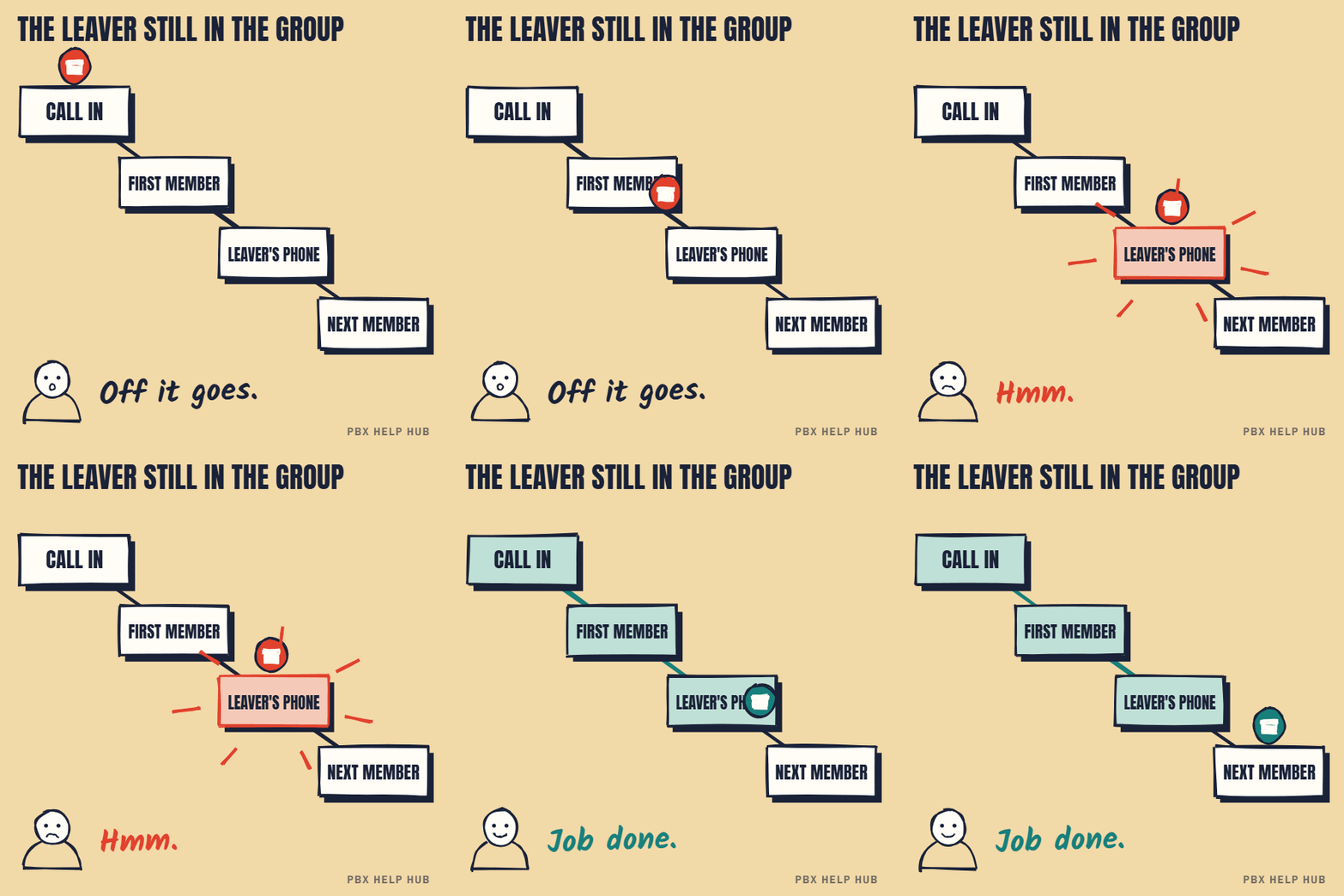
Compare the group's member list with who should ring. Leavers and new starters are the most common cause: a person who left is still first in a sequential group, or a new starter was never added.
Check 2: ring mode
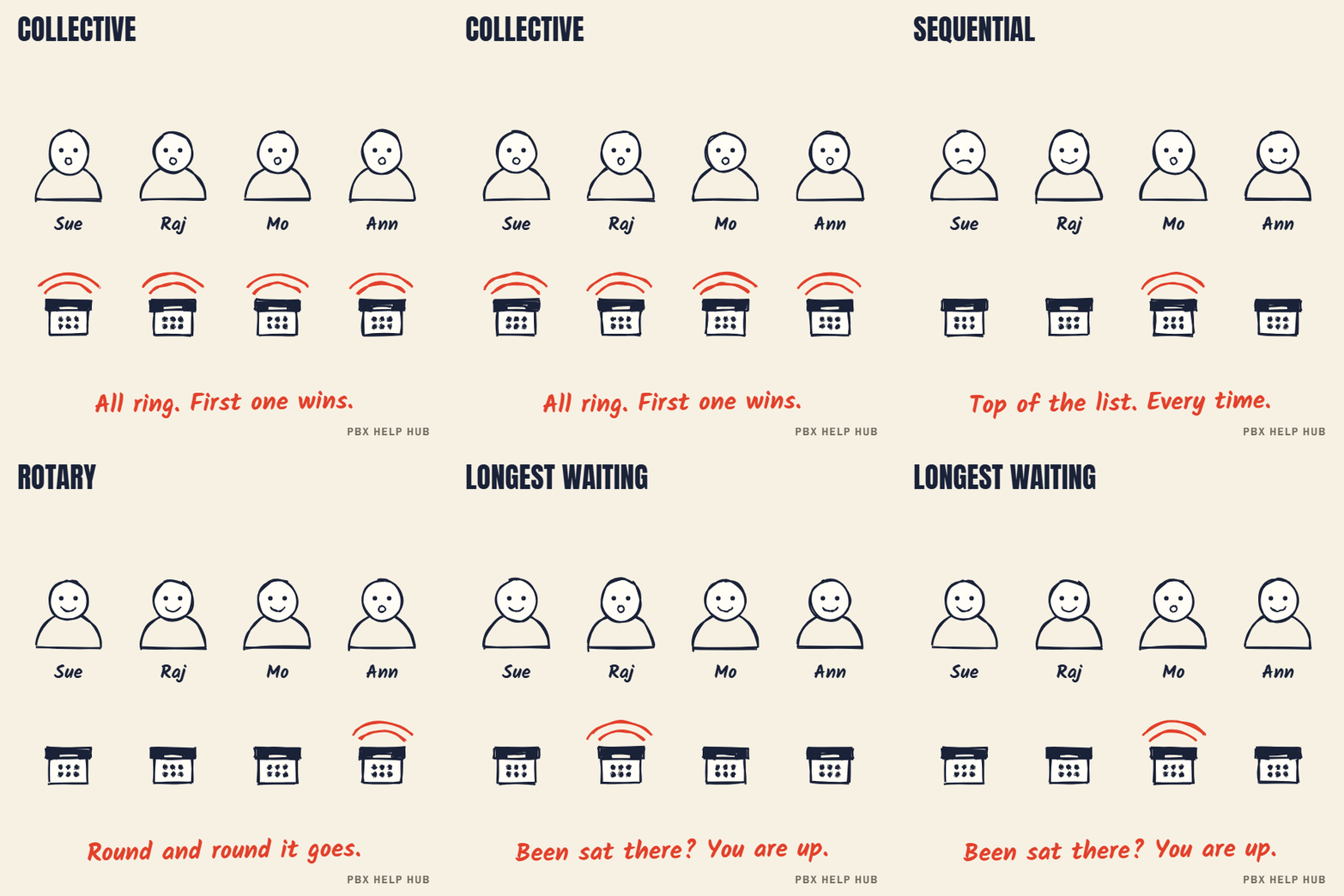
A group can ring everyone at once, in a fixed order, in turn, or whoever has waited longest. "Always the same person first" usually means a sequential group. "Some phones never ring" can mean the call is answered or moves on before it reaches them. Hunt group types explained shows each mode with a simulated team.
Check 3: service mode
A group in night service or out-of-service mode sends calls to its fallback instead of its members. If the fault is tied to time of day, go to Night service or time profile not switching.
Check 4: member status
A member on do-not-disturb or logged out isn't offered the call. A member with a forward set may be skipped, or the call may follow their forward, depending on the user's settings and the group's ring mode. Ask the person, then check their status in a read-only view. See How to forward calls on an Avaya desk phone.
| Symptom | Most likely check |
|---|---|
| One person never rings | 4, then 1 |
| Always the same person first | 2 |
| Nobody rings, callers get voicemail | 3 |
| Wrong team rings | The route, not the group |
Don't rebuild the group or change its type during working hours. Note the current settings first.
the group handles urgent or safeguarding calls and you can't confirm the cause quickly.
The four hunt group types on IP Office, compared
Avaya IP Office hunt groups ring members in one of four patterns, and the pattern explains most "wrong person" and "never rings" complaints. Choose the pattern that fits how the team works today. There's also a call-waiting variant of collective, and groups can overflow to another group, so a call may ring people outside the team.
| Type | How it rings | Typical symptom when it's wrong |
|---|---|---|
| Collective | Every available member at once | Phones ring together; nobody feels responsible |
| Sequential | Always starts at the top of the list | The first person is overloaded; people lower down never ring |
| Rotary | Starts after whoever took the last call | Calls spread evenly; complaints are rare |
| Longest waiting | Whoever has been idle longest | Fairest share; can confuse people who expect a fixed order |
Our Hunt group types explained page lets you send a test call through each type and watch who rings.
How long each member rings before the call moves on
Each member rings for the group's no-answer time before the call moves to the next member, so a long timer makes "some phones never ring" worse. In a sequential group of five with a long timer, a caller may give up before the call reaches the third person. If the last people on the list never ring, compare the timer with how long callers wait. Shortening it is a change, so note the current value and take a backup first.
Night service, out of service and the fallback group
When an IP Office hunt group is in night service or out-of-service mode, calls go to its fallback instead of its members. Night service is usually switched by a time profile or by hand; out of service is usually set by hand for a planned closure. If a team's phones are silent and callers reach voicemail or another team, check the group's current state before anything else. The out-of-hours rules are explained in Time profiles and night service explained, and stuck night service in Night service or time profile not switching.
Membership changes: the most common cause
Most hunt group faults start with a staff change that nobody applied to the group. Check the group whenever someone joins, leaves, changes team or moves desk.
- Leaver still listed: in a sequential group, calls ring an empty desk first.
- New starter missing: their phone never rings for team calls.
- Disabled member: some systems let a member be listed but switched off, which looks like "in the group but never rings".
- Hot-desk user logged out: the member exists, but there's no phone to ring.
What to note before you ask for help
A good hunt group fault report names the group, the expected members and three real calls. Write down the group's name or number, who should ring, who actually rang, the time of each test call and what the caller heard. Our fault log has a template, and IP Office Manager: read-only checks before you change anything explains how to look at group settings without changing them.
Your hunt group checklist
Tick each check as you go, then copy the list into your fault log.
- Write down the group name or number and who should ring.
- Compare the member list with that list: leavers, new starters, disabled members.
- Note the ring mode: collective, sequential, rotary or longest waiting.
- Check the group's state: in service, night service or out of service.
- Check each member for DND, forwarding or a logged-out hot desk.
- Make one test call and note who rang, and when.
How to fix a hunt group that isn't ringing
Say the sales group has stopped ringing. Work through these in order, because each one rules out a cause.
- Ring the group from a desk phone, then from a mobile. If the internal call rings the team and the mobile doesn't, the group is fine and the fault is in the incoming call route.
- Check the person is still enabled in the group. Someone can stay on the list with their membership switched off. A button can do this, which is why people can be taken out by accident.
- Check for a forward. A member with a forward set may or may not take group calls, depending on their settings. On the default short codes, *50 turns forwarding of hunt group calls on and *51 turns it off.
- Do the timing sum. The group voicemail timer defaults to 45 seconds on recent releases. In a sequential group ringing each person for 15 seconds, the call can reach voicemail before the fifth person gets a turn. Lengthen the voicemail timer, shorten each person's ring, or switch to collective ringing.
- Add any overflow time. The wait is the no-answer time plus the overflow time, so a long overflow can use up the voicemail timer before the overflow group rings.
Take a backup first, and make the change at a quiet time or ask your maintainer to do it.
Sources: Avaya: hunt group call presentation ↗ · Avaya: hunt group fallback settings ↗ · IP Office short code list (Skagit Valley College) ↗ · Tek-Tips: enable and disable buttons for members ↗ · Tek-Tips: overflow timing ↗
Common questions
Why do some people in a hunt group never ring?
In a sequential group, calls are often answered before they reach people lower down. Members on DND, forwarded or logged out are skipped too. Compare the ring mode and member statuses with who should ring.
Why does the same person always get the call first?
That's how a sequential group works: it always starts at the top of the list. A rotary or longest-waiting group spreads calls more evenly.
Why does the hunt group go straight to voicemail?
The group is probably in night service or out-of-service mode, or every member is unavailable. Check the group's service state first.
Can I change the hunt group type during the day?
You can, but it changes who rings immediately. Note the current settings, take a backup, and change it at a quiet time.
Can I forward an Avaya hunt group to an external number?
Your maintainer can usually arrange this. Ask them how it's protected from misuse. It's a configuration change, so ask your maintainer and take a backup first.
Does an Avaya hunt group have its own voicemail?
Yes, a hunt group can have its own mailbox. Agree who checks it, because messages left there don't appear in members' personal mailboxes unless the system is set up that way.
What are the Avaya hunt group ring modes?
Collective, sequential, rotary and longest waiting. The mode decides who rings first and in what order.
Sources
Last checked 9 November 2026 against the sources listed here. Menus and defaults can differ by software release, so confirm them on your own system. Spotted a mistake? Tell us.