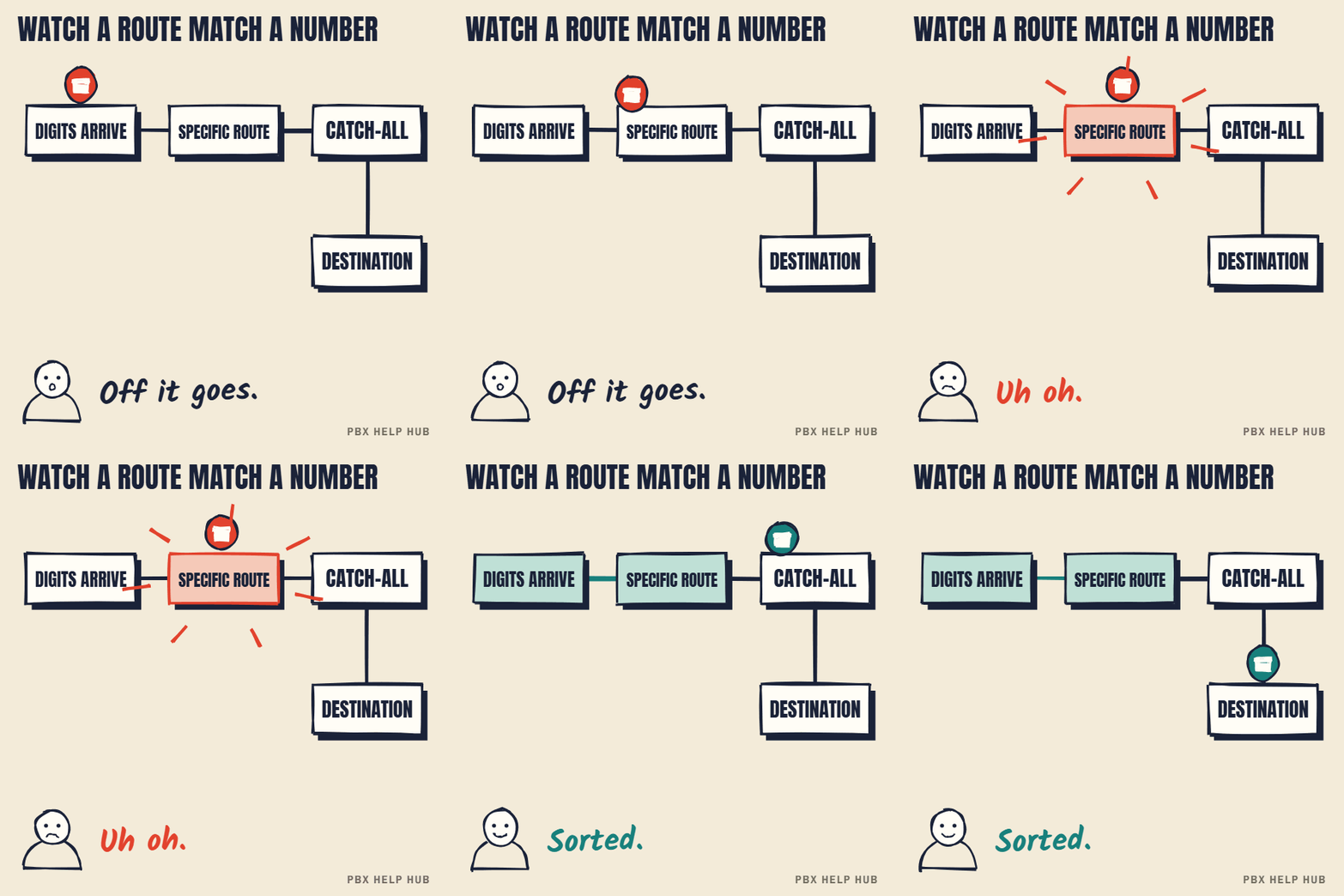
How matching works
- The carrier sends the dialled number, often as only the last few digits. Which digits arrive depends on your line. See DDI (direct dial-in) explained.
- IP Office compares those digits with each route's incoming number.
- On SIP lines, IP Office first matches the call to a line and SIP URI, then looks only at routes with the matching line group. The most specific matching route wins, and a blank number catches the rest. If the call can't be matched at the line stage, the system can reject it, and callers may hear busy or a failure message instead of reaching your catch-all. So a catch-all doesn't guarantee that no call is lost.
- The route sends the call to its destination for the current time, or to its fallback if the destination can't take it.
Why calls end up in the wrong place
- Digits don't match. The carrier sends a different format to the one the route expects, so the catch-all takes the call.
- Time-based destination. A time profile switched the route to its out-of-hours destination. See Night service or time profile not switching.
- Fallback in use. The main destination was busy or unavailable, so the fallback answered.
- A newer route is more specific. Someone added a route that now matches first.
Make one test call to the affected number while a call trace runs, and note the digits the system received and the route that handled the call. It's read-only and usually ends the guesswork. If you're not sure how, collect the evidence and ask for a fault review.
Applies to IP Office.
What an incoming call route contains
Each IP Office incoming call route is a small rule with a few parts that decide where an external call goes. The exact field names vary by release, but the parts are always similar.
| Part | What it does |
|---|---|
| Incoming number | The dialled digits this route matches. Blank means "anything". |
| Line group | Which group of lines the route applies to, useful on multi-line or multi-site systems |
| Incoming caller number | Optionally, the caller's number, to route specific callers differently |
| Destination | Where the call goes: a user, hunt group, menu or voicemail |
| Time-based destinations | Different destinations for different time profiles |
| Fallback | Where the call goes if the destination can't take it |
Why digit format matters
On Avaya IP Office, a route only matches if the digits the carrier sends match the route's incoming number in the expected format. One carrier may send +441632960123, another 441632960123, 01632960123, or only the last few digits. If a route expects one format and the carrier sends another, the call drops through to the catch-all. That's why routing faults often appear the day after a move to SIP or a change of provider, when nobody has touched the phone system.
Catch-all routes: useful, but hide mistakes
A catch-all route with a blank incoming number picks up calls that match no other route, but it also hides routes that have stopped matching. If every unmatched call goes to reception, a broken direct number can go unnoticed for weeks. When reviewing routes, check which calls are reaching the catch-all, and ask whether they should.
Routes on multi-site systems
On a multi-site IP Office, each site may have its own lines and its own routes, so the same number can behave differently depending on where it arrives. If a fault affects one site only, start with that site's lines and routes. Note which site's line received the call: it's one of the first things an engineer will ask.
Read a route without changing it
You can inspect incoming call routes safely as long as you don't send changes back to the system. Take a backup, open the configuration read-only if you can, find the route for the number, write down every part in the table above, and close without saving. IP Office Manager: read-only checks before you change anything covers the safe habits in detail. If the route looks right but calls still go wrong, the time profile (Night service or time profile not switching) or the destination itself (Hunt group not ringing, or ringing the wrong people) is the next place to look.
How to fix a number going to the wrong place
Say a new direct number keeps ringing reception. These are the checks that resolved it for people reporting the same fault.
- Trace one call. Run System Monitor, ring the number, and read the called number the carrier sent. The route's Incoming Number has to match it.
- Check the Line Group ID. IP Office only looks at routes whose Line Group ID matches the line or SIP URI the call arrived on. A correct number on the wrong line group never matches.
- Check the SIP URI. If no URI on the line matches the call, it's rejected before any route is read, so your catch-all won't help. One common recommendation on Avaya's forum is a single URI with wildcards (*) in every field, then one route per number.
- Look for old routes. In one reported case, new numbers rang the wrong group until two old entries that didn't belong were deleted. Where routes match equally, the one added first wins.
- Delete and re-add the route if it looks right and still doesn't match. That was a suggested fix in the same thread.
Take a backup first, and make the change at a quiet time or ask your maintainer to do it.
Sources: Avaya: SIP incoming call routing ↗ · Tek-Tips: new DDIs ringing the wrong group ↗ · Avaya forum: SIP incoming calls fail ↗
Common questions
What is an incoming call route on IP Office?
It's the rule that decides where an external call goes, based mainly on the number dialled. Each route has an incoming number, a destination and optionally a fallback and time-based destinations.
Why does a call go to the catch-all route?
Because the digits the carrier sent don't match any more specific route. This often happens after a carrier or SIP change, when the number arrives in a different format.
What is the fallback on an incoming call route?
It's where the call goes if the main destination can't take it, for example when it's busy or unavailable.
Can two routes match the same number?
Yes. The system uses the most specific match, so a newly added route can start taking calls that used to go elsewhere.
Can I block an incoming number on Avaya IP Office?
Often yes: an incoming call route can match on the caller's number and send that caller to a chosen destination. It's a configuration change, so ask your maintainer, and check your carrier's call-blocking options too.
How does caller ID work on IP Office incoming calls?
The carrier passes the caller's number along with the number dialled. The system can display it, and routes can optionally match on it.
Sources
Last checked 9 November 2026 against the sources listed here. Menus and defaults can differ by software release, so confirm them on your own system. Spotted a mistake? Tell us.